
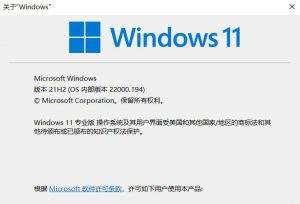
How to Install the General Availability Release of Win11 On October 5, 2021, Microsoft released Windows 11 to general availability, bringing a host of new features; Windows 10 users who meet the hardware requirements can now upgrade. Win11 Why the upgrade matters and what’s new in the system Support for Android apps is coming, and is expected to arrive within a few months An all-new UI and sound design make the system more modern, cleaner, and more attractive, with a
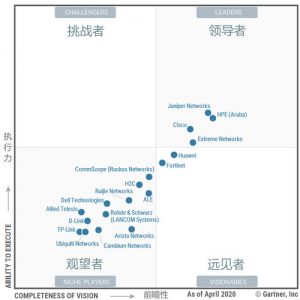
Understanding Gartner’s 2020 Magic Quadrant for Wired and Wireless LAN Access Infrastructure
Recently, Gartner released its 2020 Magic Quadrant for Wired and Wireless LAN Access Infrastructure, featuring 18 WLAN vendors worldwide. In the report, Gartner expressed strong optimism about the market’s future. It predicted that by 2023, more than 90% of enterprise campuses would connect devices through intent-based networking. In this edition of the Magic Quadrant, most vendors are clustered in the Niche Players quadrant at the bottom left, while the Challengers and Visionaries quadrants are notably sparse. The top four vendors—Juniper
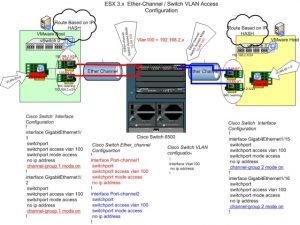
Configuration Examples for EtherChannel/LACP on ESXi/ESX and Cisco/HP Switches
Purpose This article describes the concepts, limitations, and some configuration examples (specifically for Cisco and HP) of link aggregation, NIC teaming, Link Aggregation Control Protocol (LACP), and EtherChannel connections between ESXi/ESX and physical network switches. Resolution Note: Many requirements must be considered before implementing any form of link aggregation. For detailed and related information about these requirements, see Host requirements for link aggregation for ESXi and ESX (1001938). Link aggregation concepts: EtherChannel: This is a link aggregation (port trunking) method
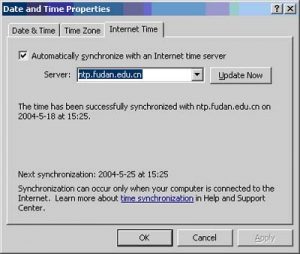
Network Time Synchronization Service
NTP (Network Time Protocol) is an Internet protocol that precisely synchronizes computer clocks on a network with a time source. It can keep the difference between the local clock and a reference clock within 1 millisecond. The NTP server address provided by the Fudan University Network Center is: ntp.fudan.edu.cn?. Client Setup Instructions: Windows XP Double-click the clock in the lower-right corner of the taskbar -> Select Internet Time -> Enter “ntp.fudan.edu.cn” as the server address. Windows 2000 1. Go to
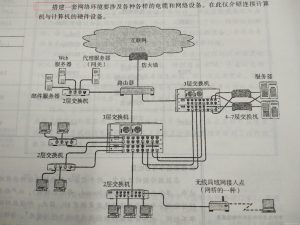
Computer Networking Basics: The Components of a Network
1. Communication Media and Data Links: The unit of transmission rate is bps (Bits Per Second). Strictly speaking, the speed at which signals travel through any transmission medium is constant. Therefore, even if data links have different transmission rates, the transmission speed will not fluctuate (because the speed of light and electric current is constant). Transmission rate is also called bandwidth. The greater the bandwidth, the stronger the network’s transmission capability. In addition, the actual transmission rate between hosts
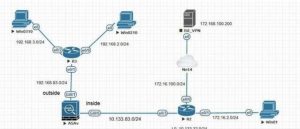
Introduction to Cisco and Huawei Lab Simulators
Introduction When learning networking, hands-on labs are unavoidable — yet most people don’t have real hardware and can’t build a real environment. Fortunately, the networking field offers a wealth of simulators that can faithfully emulate more than 90% of functionality, achieving a level of realism that is hard to distinguish from the real thing. This is good news for network learners. Below we introduce the simulators most commonly used by network engineers. Cisco or Huawei? Before we begin, let’s answer
How to Use Synology’s Active Backup for Business (ABB) Suite
How to Use Synology’s Active Backup for Business Suite (ABB Suite) 【Introduction】 When it comes to backing up a personal PC, most people think of GHOST. GHOST was once all the rage across the country, but the year is already 8102, and GHOST — which does not support UEFI and cannot back up multiple machines in batches — is long past its prime. Today I would like to introduce Active Backup for Business, the backup suite Synology has just released.
Official Synology Data Recovery Methods
If your DiskStation fails unexpectedly, you may need to recover the data stored on its hard drives. With just an Ubuntu Live CD and a computer, you can easily recover the data stored on the DiskStation hard drives. Please refer to the following steps. Prepare a computer with enough hard drive slots to install the hard drives removed from the DiskStation. Remove the hard drives from the DiskStation, then connect them to the computer. For RAID or SHR configurations, you
Synology NAS ABB Bare-Metal Backup and Recovery Lab Manual
This manual is mainly about how to create a boot disk. First, you need to install the ABB application, which requires an internet connection. If there is no internet access, find another machine that can reach the official website to download the installation package for this device, and then upload it. When installing the software, you need to create a storage space; simply follow the NAS wizard. ABB needs to be activated after it is installed for the first time.
How to Troubleshoot Wi-Fi Issues Using Debug Metrics
Foreword This article explains how to understand the Debugging Metrics information on the AC controller’s Statistics page, and how to use that information to troubleshoot and resolve common Wi-Fi faults. Introduction In controller version 5.6.x, we added a new page, Debugging Metrics, to the Statistics panel. This new page is designed to make it easier for wireless administrators to pinpoint faults and resolve common Wi-Fi performance issues. To use the Debugging Metrics feature, you need v.5.6.x or a