

Security Assurance, Rapid Response, and Recovery
When it comes to strengthening security safeguards and achieving professional security management, the advantages of IT operations are particularly pronounced, as reflected in the following aspects: 1. Proactive Prevention and Monitoring: By implementing comprehensive monitoring strategies, the IT operations team can detect system status in real time, identify potential security threats and performance bottlenecks. This proactive approach helps resolve issues before they occur, greatly reducing the impact of security risks and system failures on the business. 2. Professional Security Strategy

Flexibility and Adaptability
IT network operations outsourcing can indeed significantly enhance an enterprise’s flexibility and adaptability, and this strategy is drawing increasing attention in modern enterprise management. The following key aspects explain how IT network operations outsourcing helps enterprises achieve greater flexibility and adaptability: 1. Professional skills and experience: A professional IT network operations outsourcing company has an experienced technical team capable of handling a wide range of complex technical issues and ensuring the stable operation of enterprise IT systems. Outsourcing providers can

Implementing Zero Trust Architecture to Meet an Evolving Threat Landscape
Evolve perimeter-based defenses with a zero trust architecture and identity-based network security approach Why use zero trust? Zero trust is a modern approach to reducing the risk and impact of cyber threats. Amid rising cyberattacks and a growing number of access points, chief information security officers are exploring zero trust to promote appropriate access to resources while limiting adversaries’ lateral movement. Unlike the traditional “castle and moat” information security model, in which everyone inside the moat is implicitly trusted, zero

Fast Response, Efficient Operations-Style Service
IT Operations Outsourcing, as an efficient operations solution, provides enterprises with comprehensive professional technical support, ensuring the stable and efficient operation of their IT systems. Below is a detailed analysis of IT Operations Outsourcing in terms of efficient operations and professional technical support: I. Efficient Operations Rapid Response and Problem Resolution IT operations outsourcing providers have experienced technical teams that can quickly respond to and resolve the IT issues enterprises encounter. Their technicians possess professional skills and knowledge, enabling them

Reduce operating costs and management risk
IT Operations Outsourcing can help enterprises reduce a number of fixed costs, mainly in the following areas: Infrastructure Costs Hardware Procurement and Maintenance: Building IT infrastructure in-house requires servers, storage devices, network equipment and other hardware, along with the ongoing maintenance costs that follow. A package service, by contrast, can often supply the required network equipment and take on the ongoing operations and maintenance work, reducing the company’s subsequent investment in hardware maintenance. Operating Costs Routine Operations Costs: Day-to-day IT

High-Speed Wireless Networks to Power Business Growth
In today’s information age, networks have become an indispensable part of our daily lives and work. For enterprises, an efficient, stable, and secure wireless network is a key factor in keeping work moving forward and enabling efficient office operations. Slow wireless networks, network lag, dropped connections, and poor signal coverage also frequently trouble enterprises and undermine productivity. In response, Siwenlide offers detailed customized solutions, developing wireless coverage concepts and plans based on actual conditions to help enterprises resolve their wireless

Siwenlide Awarded Its First ISO 9001 Quality Management System Certificate
Update (September 2026):This article documents our first ISO 9001 certification. After that batch of certificates expired, the renewal has been completed; the registration number of the currently valid ISO 9001 certificate is 03826Q04830R001 (GB/T 19001-2016 / ISO 9001:2015, scope: computer application software development, network hardware operations and maintenance), issued by Beijing Shibiao Certification Center Co., Ltd., valid until September 21, 2029. The ISO 20000 certificate renewed in the same batch carries registration number 03826IT00184R001. See the system certification certificate table

Siwenlide Achieves Its First ISO20000 IT Service Management System Certification
Update (September 2026):This article documents our initial ISO 20000 certification. Those certificates have since expired and been renewed. The registration number of our currently valid ISO 20000 certificate is 03826IT00184R001 (ISO/IEC 20000-1:2018; scope: information technology service management activities related to computer application software development and network hardware operations and maintenance provided to external clients). It was issued by Beijing World Standard Certification Center Co., Ltd. and is valid until September 21, 2029. The ISO 9001 certificate renewed at the same

Network Firewall Magic Quadrant
Magic Quadrant for Network Firewalls December 19, 2022 By: Rajpreet Kaur, Adam Hils and With the emergence of cloud firewalls and firewall-as-a-service offerings, network firewalls are evolving into hybrid mesh firewalls, making the selection of the most suitable vendor a challenge. Gartner evaluated 17 vendors to help security and risk management leaders make the right choice for their organizations. Strategic Planning Assumptions By 2026, more than 60% of organizations will deploy more than one type of firewall, which will drive
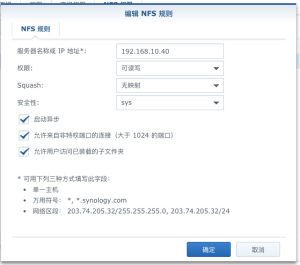
Extending VMware ESXi Storage with Synology NFS
This article uses ESXi 6.7 and Synology NAS 6.x as examples. First, enable the NFS service on the Synology NAS; it is disabled by default. The steps are as follows. 1. In DSM, go to Control Panel > File Services > SMB/AFP/NFS, and check Enable NFS service. 2. In Control Panel, go to Shared Folder, select the folder you want ESXi to use, and click Edit. 3. Then select NFS Permissions, click Create, and note down the mount path. 4.